ADVERTISEMENT


The Link to Windows app has recently undergone some exciting updates, enhancing its functionality and user experience. Seamlessly bridging the gap between your Android phone and Windows PC, this app continues to be a vital tool for those looking to integrate their mobile and desktop environments. The latest update emphasizes improvements in connectivity stability, ensuring that interactions between your devices are smoother than ever. Enhanced support for more Android devices widens the scope of phones that can take full advantage of this service, while new security features assure users of improved data protection. Additionally, increased performance in the syncing process means that notifications, messages, and other data transitions between your phone and PC occur faster and more efficiently. All these enhancements aim to provide an even more cohesive and satisfying user experience with the Link to Windows app.
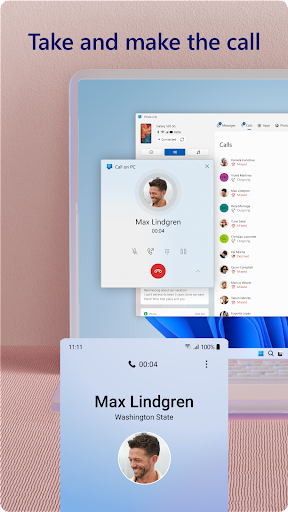
1. **Phone Calls**: The Link to Windows app allows you to seamlessly make and receive calls directly from your PC, provided your setup includes a Windows 10 PC with Bluetooth capability. This feature means you no longer need to juggle between devices during important calls.
2. **Notifications Management**: Stay on top of your notifications without interrupting your workflow on your desktop. The Link to Windows apk lets you see and manage your Android phone's notifications on your Windows PC, ensuring you never miss an important alert.
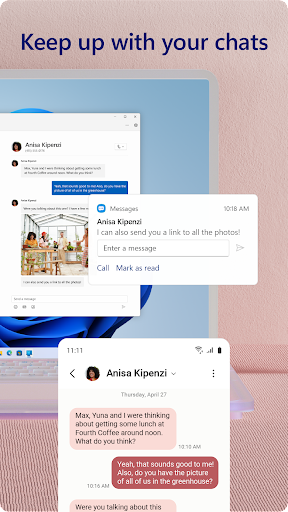
3. **Messages**: Reading and replying to text messages from your PC is more convenient than ever. The messaging integration ensures that your conversations are never interrupted and you can continue your chats using your PC’s keyboard.
4. **File Transfer**: The ability to drag and drop files between your PC and phone makes transferring documents, photos, and videos instantaneous and simple. This feature is especially useful for tasks that require frequent file exchanges.
5. **Mobile Apps Access**: With the Link to Windows app, you can access your favorite Android apps on your PC, giving you access to the mobile applications that are indispensable to your daily routine.
1. **Seamless Integration**: The app provides a seamless integration between Android devices and Windows PCs, allowing users to effortlessly transition between phone and PC usage.
2. **Increased Productivity**: By consolidating messaging, notifications, and calls into the PC environment, the Link to Windows app encourages greater productivity by reducing the need to switch devices.
3. **User-Friendly Interface**: The interface is intuitive, making the learning curve minimal and interaction natural for users of all tech skill levels. This ensures easy onboarding for new users.
4. **Cost-Effective**: Being a free Link to Windows app, there is no financial barrier to downloading and installing the app, making it a cost-effective tool for enhancing workflow.
5. **Cross-Device Editing**: The app supports advanced features like cross-device copy and paste, allowing users to efficiently manage content across their phone and PC.
1. **Device Compatibility**: Unfortunately, some features require specific devices, such as the phone screen and file drag-and-drop, which are limited to compatible Microsoft Duo, Samsung, or HONOR devices.
2. **Bluetooth Requirement**: To fully utilize the calling features, a PC with Bluetooth capability is necessary, which may not be available on older models.
3. **Limited iOS Support**: Currently, the Link to Windows app emphasizes compatibility with Android devices, and iOS users might find a lack of comprehensive support.
As an avid user, the Link to Windows app has dramatically improved how I interact with my phone from my PC, and I couldn't be more pleased with the results. Gone are the days of distractedly reaching for my phone or emailing myself photos to download onto my computer. This app's capability to combine all crucial functions — texting, notifications, calls, file sharing, and app usage — into one centralized hub on my desktop has streamlined my workflow beyond what I initially expected.
Installation was a breeze, requiring minimal setup — simply download Link to Windows and start the pairing process with your PC through the Phone Link integration. The user interface is incredibly intuitive, bringing a straightforward approach that allows users of all tech-savviness levels to navigate and utilize with ease. I've been able to manage my day-to-day tasks with improved efficiency, thanks to its excellent syncing abilities.
Of course, there are some limitations in terms of device compatibility and feature access in the Link to Windows installation process, but for those with supported devices, it is a game-changer. I highly recommend exploring this app if you're an Android user aiming to unify your mobile and desktop experiences.
1. **How do I download and install Link to Windows?**
To download Link to Windows, visit your Android device's settings and access the Quick Access tray by swiping down from the top of your screen, where you can find the Link to Windows app. It comes pre-integrated, so no download from the Play Store is necessary.
2. **Do I need a specific Android version to use Link to Windows?**
Yes, for optimal functionality, your Android device should be running Android 11.0 or higher. Refer to the official website for a complete list of compatible devices.
3. **How do I login to Link to Windows after installation?**
Login requires pairing your Android phone with your Windows PC through the Phone Link app on your computer. Follow the on-screen instructions to complete the linking process.
4. **Are there any costs associated with using the Link to Windows app?**
No, the Link to Windows app is free to use, making it accessible for anyone looking to integrate their phone and PC without any additional financial burden.
5. **Can I use Link to Windows with an iOS device?**
While the focus of Link to Windows is primarily on Android integration, there are alternatives for iOS users, but these might not offer the same comprehensive integration experience as Android.
Embrace the future of device integration with the Link to Windows app — a powerful tool at your fingertips that enhances productivity and bridges your digital life across platforms. Explore the capabilities and transform the way you manage your devices today.