ADVERTISEMENT


Welcome to the latest edition of the **2degrees Mobile app**, where our dedicated team of tech gurus has transformed your mobile management experience. Regardless of how familiar you were with the app before, you’re in for a treat with these updated features that will make communication and account management a breeze. If it’s been a while since you last logged in, you may now need to re-register using your email address. This transition is not just a formality – it's an enhancement allowing you to manage multiple 2degrees phone numbers seamlessly with a single login. This update provides an elevated sense of connectivity and control, ensuring that managing your 2degrees accounts is now easier and more efficient than ever on both **Android** and **iOS** platforms.
The **2degrees Mobile app** is loaded with user-friendly features designed to provide a comprehensive management suite for your mobile communication needs. Here’s a closer look at some key functionalities:
1. **Account Management**: Whether you're on a Prepay or Pay Monthly plan, the app lets you easily check your balance at any time. It's a one-stop hub for keeping track of all your account details with just a few taps.
2. **Bill Breakdown**: Dive into your Pay Monthly bills with detailed insights. This feature allows you to understand where every cent goes, helping you monitor your spending and maintain budget control.
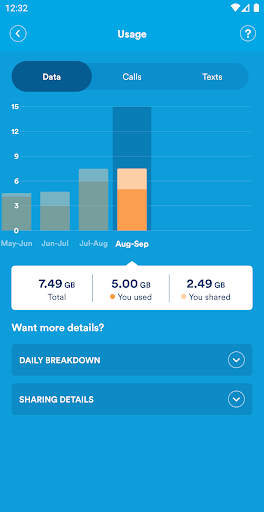
3. **Usage Tracking**: With visually engaging graphs, the app presents a breakdown of your call, text, and data usage. Such clear representation ensures that the information is easy to understand at a glance.
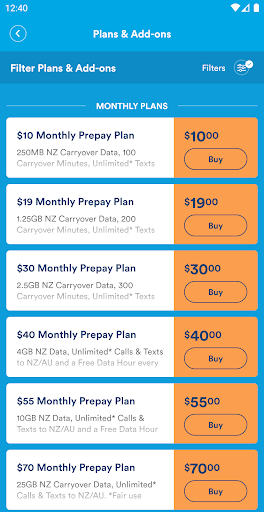
4. **Add-Ons Management**: Customize your plan further by managing digital add-ons directly within the app. This feature offers flexibility, allowing each user to tailor their account to their specific needs.
5. **Automatic Payment Options**: Enhance your convenience by turning on Autopay for Prepay plans and add-ons. This feature ensures that you keep your services uninterrupted without any manual top-ups.
1. **Ease of Use**: The app’s intuitive interface makes navigation simple for all users, reducing the complexity of mobile account management.
2. **Multiple Accounts Management**: With one easy login, managing multiple 2degrees phone numbers has never been more straightforward, catering especially well to families or users with multiple devices.
3. **Insightful Data Presentation**: The use of funky, easy-to-read graphs allows for a quick assessment of usage statistics which aids in better decision making regarding plan adjustments.
4. **Comprehensive Payment Management**: From setting up autopay to managing payment cards, the **2degrees Mobile app** provides a straightforward process for handling financial transactions.
5. **Broad User Accessibility**: Available on both **Android** and **iOS**, the app ensures wide device compatibility, making it accessible to a diverse range of users.
1. **Business User Limitation**: The current version may not cater well to business customers who require more advanced tools and support from an account manager.
2. **Re-registration Requirement**: Returning users are required to re-register with an email address, which may be an inconvenience for those accustomed to the older login process.
3. **Fair Use Policy Restriction**: Certain features and functionalities may be limited by the Fair Use Policy, which can affect users who require more extensive usage.
As someone who values seamless integration and comprehensive service management, the **2degrees Mobile app** impressively ties together a variety of features into an intuitive platform. When I first attempted the re-registration process, I found it straightforward despite initial hesitation. The added capability to control multiple numbers under one account was particularly helpful, allowing me substantial convenience in managing both personal and work lines without switching accounts. The clean visual data presentation instantly appealed to me, providing a quick and clear view of my usage. While I can appreciate that the re-registration might require a slight learning curve especially for returning users, the app’s benefits far outweigh the minimal inconvenience. The ability to install and enjoy this service on my preferred platform, whether it’s **download 2degrees Mobile** or going for a **2degrees Mobile apk**, ensures an effortless setup and usage. In my view, for any **2degrees** customer seeking efficient account management, this **free 2degrees Mobile app** is not just beneficial, it’s practically essential.
1. **How do I begin with the 2degrees Mobile app?**
- To get started, **download 2degrees Mobile** from the Google Play Store for **Android** or the App Store for **iOS**. Once downloaded, complete the **2degrees Mobile installation** and re-register with your email address to set up your login details.
2. **Can I manage multiple accounts with the app?**
- Absolutely! The app allows you to manage several 2degrees phone numbers from a single login, perfect for those handling more than one account.
3. **What if I'm a business customer?**
- For business users with an account manager, it's recommended to consult your account manager as this app might not cover all your specific service requirements.
4. **What payment methods can I use to top up?**
- You can top up using a credit card, POLi, or vouchers, giving you flexible options for maintaining your account balance.
5. **What should I do if I forget my 2degrees PIN?**
- The app allows you to easily reset your 2degrees PIN, ensuring you don’t face any disruptions when calling customer service.
6. **Is the app free?**
- Yes, the **2degrees Mobile app** is free to download and install. However, note that certain usage may be subject to the Fair Use Policy.
Navigating mobile communication is more innovative than ever with the **2degrees Mobile app**. Enhance your mobile experience by discovering these advanced features and enjoy seamless connectivity at your fingertips.