ADVERTISEMENT


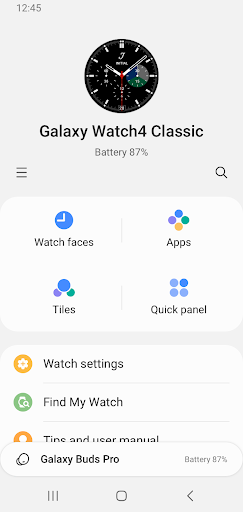
Welcome to the Galaxy Wearable (Samsung Gear) app, your ultimate companion in connecting and managing Samsung's innovative wearable devices right from your mobile device. Designed to bridge the functionality of your phone and wearable tech, this app ensures you harness the full power and convenience of your Samsung Gear, Galaxy Watch, Galaxy Buds, and other supported devices effortlessly. With seamless setup, quick updates, and intuitive management, Galaxy Wearable transforms the way you interact with your tech, providing ease, efficiency, and personalization like never before.
Our latest release brings enhanced stability and new features to ensure you get the most out of your wearable devices. We've focused on streamlining the connectivity process and enriching the user interface to make navigation more intuitive. Key updates include improved software update notifications ensuring you're always running the latest firmware, and expanded compatibility options to include more devices across various regions. We've also enhanced our "Find My Watch" feature, adding an extra layer of security and convenience for users who might often misplace their devices. Keep your Galaxy Wearable (Samsung Gear) app updated to enjoy all these fresh features.
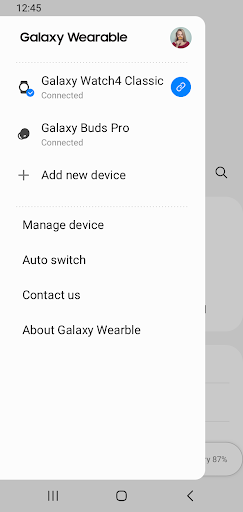
1. **Seamless Device Connectivity**: Easily connect and disconnect your Samsung wearables to your mobile device via Bluetooth. Experience a robust, stable connection for uninterrupted access and management of your features.
2. **Effortless Software Updates**: Stay updated with the latest software enhancements. The app notifies you when updates are available, allowing you to install them quickly to enhance performance and add new functionalities.
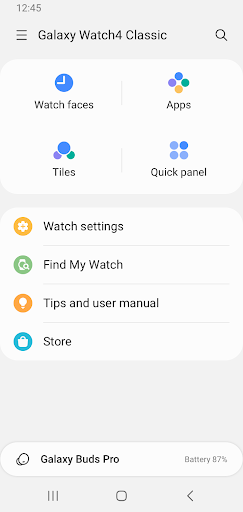
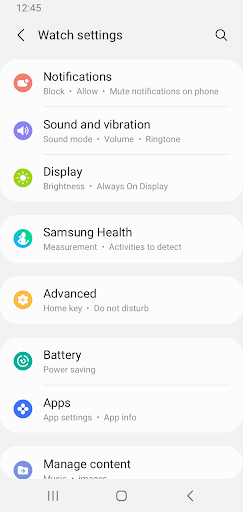
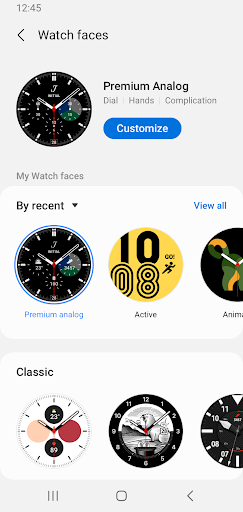
3. **Comprehensive Device Management**: From customizing clock settings to adjusting notification preferences, you have full control. Download and configure applications directly through the app, expanding your wearables' capabilities to fit your lifestyle.
4. **Powerful Locator Tools**: The "Find My Watch" feature gives peace of mind by helping you locate misplaced devices. Whether left at a café or under the couch, easily retrieve your valuable gadgets.
5. **Personalized Notifications**: Manage how and which notifications appear on your wearable, ensuring you only get the alerts that matter. Tailor-made for efficiency without the noise.
1. **User-Friendly Interface**: The simple and intuitive design makes it easy to navigate and manage all functions without a steep learning curve.
2. **Universal Compatibility**: Designed specifically for Samsung wearable users, but includes support for a wide spectrum of devices, ensuring every user can get the most out of the app.
3. **Enhanced Security Features**: With functionalities like "Find My Watch," users are empowered with tools to ensure their devices are always secure and within reach.
4. **Regular Updates**: Continuous improvements and feature add-ons keep the app fresh, relevant, and aligned with cutting-edge technology trends.
5. **Rich Customization Options**: Personalization options ensure that you can adapt the app’s settings and your device's features to perfectly match your individual needs and preferences.
1. **Device Limitations**: The Galaxy Wearable (Samsung Gear) app does not support Gear VR or Gear 360, potentially limiting users who own these devices.
2. **Region and Operator Restrictions**: Compatibility and feature availability may vary depending on regional and operator differences, which could affect user experience.
3. **Access Dependencies**: Some features rely heavily on having permissions set correctly, which can occasionally disrupt setup for less tech-savvy users.
I’ve had the pleasure of using the Galaxy Wearable (Samsung Gear) app for several months. My experience has been seamless overall, especially when setting up connections and managing software updates. Its interface is straightforward, allowing me to personalize notifications and update my gadgets without hassle. However, I did encounter some limitations with incompatible devices, specifically Gear VR, which was a bit disappointing. Nonetheless, the app’s strengths, like its security features and update regularity, make it indispensable for any Samsung wearable owner. My verdict? It’s an efficient, user-friendly tool that manages and enriches your wearable experience.
**1. How can I download and install the Galaxy Wearable (Samsung Gear) app?**
- The Galaxy Wearable (Samsung Gear) app can be downloaded from the Google Play Store for Android devices and the Apple App Store for iOS devices. Simply search for “Galaxy Wearable” and follow the installation steps.
**2. What should I do if my wearable device isn't connecting to the app?**
- Ensure Bluetooth is enabled on your mobile device. Next, check that your wearable device is compatible and fully charged. Reboot both devices and attempt pairing again through the Galaxy Wearable app.
**3. Can I use the app with non-Samsung phones?**
- The Galaxy Wearable (Samsung Gear) app is optimized for Samsung devices but can be installed on other Android devices. However, functionality may be limited compared to Samsung's own handsets.
**4. Are software updates mandatory for continued use of the app?**
- While not mandatory, keeping your app and devices updated ensures improved functionality, security enhancements, and access to the latest features.
**5. How to grant necessary permissions for the Galaxy Wearable (Samsung Gear) app?**
- On your Android device, navigate to Settings > Apps > Galaxy Wearable > Permissions. Ensure that all necessary permissions are enabled to take full advantage of the app's features.
By utilizing the Galaxy Wearable (Samsung Gear) app, you’re not just managing devices; you’re tapping into a world of convenience and personalized tech control. Download today and explore the endless possibilities that come with your Samsung wearable experience.