ADVERTISEMENT


The Kasa Smart app continues to enhance its features with recent updates, making it more efficient and versatile for managing your smart home setup. The latest version improves the user interface for an even more intuitive experience, ensuring seamless navigation between different functionalities. New compatibility updates allow the app to support additional TP-LINK devices, providing users with more flexibility and options. Improved stability enhancements have been introduced to ensure a more reliable connection with all smart devices, minimizing any disruptions. These updates underscore the commitment to ensuring that the Kasa Smart app remains user-friendly and efficient, catering to the evolving needs of smart home enthusiasts.
1. **Comprehensive Device Management:** The Kasa Smart app allows you to add, configure, monitor, and control your connected TP-LINK Smart Home devices from anywhere in the world. Whether you have smart plugs, switches, bulbs, or cameras, the Kasa Smart app offers complete control at your fingertips, making home automation a breeze.
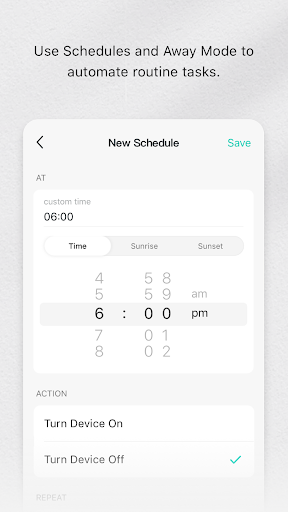
2. **Custom Scheduling:** Create personalized schedules for your appliances and smart devices, automating when they turn on or off based on your daily routine. This feature ensures that your home is working efficiently to complement your lifestyle and can help in reducing energy consumption.
3. **Away Mode:** Enhance your home security with the Away Mode feature, which simulates the presence of occupants by randomly turning devices on and off. This deters potential intruders, providing peace of mind when you’re away.
4. **Voice Control Integration:** The app supports voice commands through integration with voice assistants like Amazon Alexa, Google Assistant, and others, allowing you to control your devices hands-free. This feature makes managing your smart home more accessible and convenient.
5. **Energy Monitoring:** Some TP-LINK devices like the Smart Plug HS110 come with energy monitoring capabilities. The Kasa Smart app provides insights into your energy usage, helping you make smarter choices about how and when to use your devices.
1. **User-Friendly Interface:** The Kasa Smart app boasts a straightforward and intuitive interface, making it easy for users to set up and control their smart home devices with minimal hassle.
2. **Global Access:** With remote access capabilities, you can manage your home from any location in the world. This flexibility ensures that your smart home remains manageable and secure even when you’re traveling.
3. **Extensive Device Compatibility:** The app supports a wide range of TP-LINK smart devices, allowing for an integrated and comprehensive smart home solution. With continuous updates, more devices are being added to the compatibility list.
4. **Enhanced Security Features:** The Away Mode is a standout security feature, adding an extra layer of protection to your home by simulating activity and deterring intruders when you’re not present.
5. **Free App Availability:** The Kasa Smart app is available for free download on both Android and iOS platforms, making smart home management accessible to a broad audience without additional costs.
1. **Limited Device Compatibility:** While it supports a wide range of TP-LINK devices, users with non-TP-LINK smart devices will find the compatibility limited, restricting integration into a cohesive smart home ecosystem.
2. **Dependent on Stable Internet Connection:** The app requires a stable internet connection for optimal performance. Any disruptions in connectivity can affect the app's functionality and the control of smart devices.
3. **Occasional Lag:** Users may experience occasional lag or delays in response time, particularly when the app is handling multiple devices simultaneously, which can somewhat hinder the user experience.
From the moment I downloaded the Kasa Smart app, I was impressed by its user-centric design and robust functionality. As someone who relies on a smart home setup for convenience and security, the Kasa Smart app stands out with its comprehensive device management and global access. It’s incredibly satisfying to be able to control my TP-LINK devices from anywhere, ensuring my home is always running at peak efficiency.
The custom scheduling feature has been particularly beneficial, allowing me to automate my daily routines with ease. The Away Mode adds an extra layer of assurance, simulating presence and keeping any intruders at bay. The voice control integration with Alexa makes hands-free operation a reality, adding seamless connectivity into daily life.
However, it's worth noting some limitations, such as the app’s dependency on a stable internet connection and its restricted compatibility with non-TP-LINK devices. These minor drawbacks do not overshadow the app’s strengths and its role in smart home management.
Overall, the Kasa Smart app is an essential tool for anyone invested in the TP-LINK smart device ecosystem. It’s easy to navigate, offers reliable performance, and provides features that significantly enhance home automation. For anyone looking to get started with smart home technology, I highly recommend downloading the free Kasa Smart app for an enriched experience.
1. **How do I download the Kasa Smart app?**
- The Kasa Smart app is available for free download on both Android and iOS devices. Simply visit the Google Play Store or Apple App Store, search for "Kasa Smart," and proceed with the download and installation process.
2. **What devices are compatible with the Kasa Smart app?**
- The app is compatible with various TP-LINK devices, including Smart Plugs, Smart Switches, Smart Bulbs, IP Cameras, Smart Routers, and Range Extenders. For a detailed list, you can refer to the app description or TP-LINK's official website.
3. **Can I use the Kasa Smart app on multiple devices?**
- Yes, you can install the Kasa Smart app on multiple devices and log in with the same account, allowing you to manage your smart home seamlessly from different locations and devices.
4. **Is there a cost to use the Kasa Smart app?**
- The Kasa Smart app is completely free to download and use, providing access to its range of features without any additional charges.
5. **How do I log in to the Kasa Smart app?**
- Once the app is installed, you will need to create a TP-LINK account or use an existing one to log in. This account will allow you to manage your devices and settings within the app.
6. **Are there any restrictions on the number of devices I can connect with the Kasa Smart app?**
- There are no strict restrictions on the number of devices you can connect, but for optimal performance, ensure your network can support all the devices you integrate.