ADVERTISEMENT


The VIZIO Mobile app has recently received a series of exciting updates designed to enhance your entertainment experience. Whether you're managing your TV content or fine-tuning your soundbar settings, the new features in our free VIZIO Mobile app have you covered. We've optimized performance for both Android and iOS platforms to ensure that users can enjoy seamless control over their entertainment ecosphere. With these updates, there’s never been a better time to download VIZIO Mobile and elevate your media interactions. Our team is committed to providing users with consistent improvements, ensuring your VIZIO Mobile installation is efficient and straightforward, and continuing to bring the best in home entertainment management.
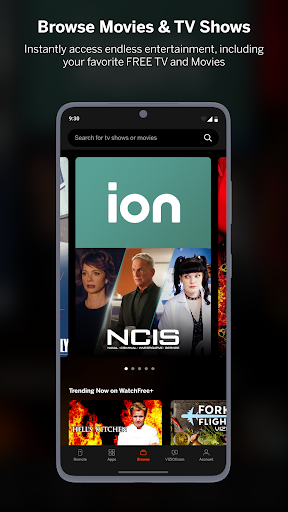
1. **WatchFree+:** The VIZIO Mobile app presents an incredible opportunity to enjoy more than 300 free live channels with WatchFree+. Whether you're on the go or at home, the experience of free live TV is just a click away. This feature lets you continue watching content seamlessly from your TV to your phone, ensuring you never miss a moment of your favorite programming. Users can tailor their viewing experience by selecting “Favorite” channels for quick access and personalizing their lineup to fit their preferences. Keeping up with local sports and news is now easier than ever, making the VIZIO Mobile apk an essential tool for the modern viewer.
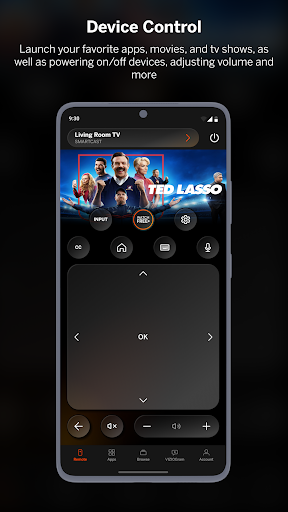
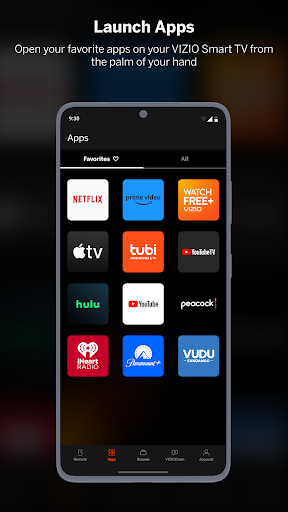
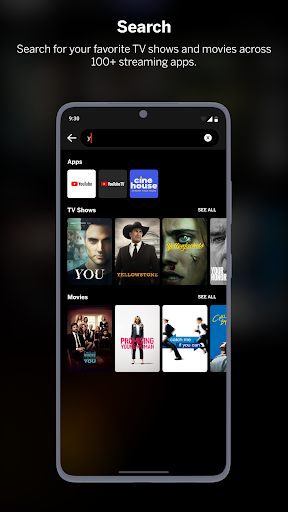
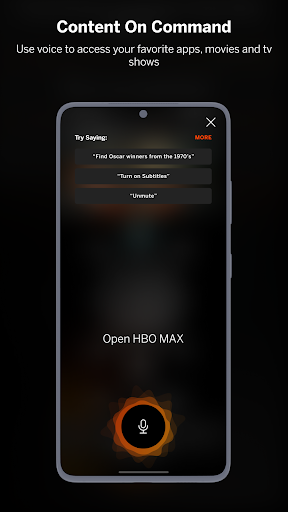
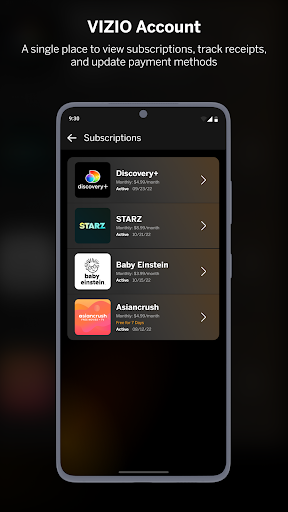
2. **TV Control:** With the ultimate entertainment companion at your fingertips, explore, control, and stream directly from your phone. The app simplifies the browsing process by letting you discover new TV shows or movie obsessions quickly. For smart streaming, the app allows you to compare where to watch your favorite content at the best possible price. Organizing your favorite apps and launching them on your TV with just one click makes this feature both efficient and user-friendly. Additionally, voice control capabilities mean you can stream your favorite content without even lifting a finger. Manage your subscriptions comprehensively in one place with the VIZIO account to save time and enhance your streaming journeys.
3. **Soundbar Control:** Enhance your audio experience by controlling your soundbar directly through the VIZIO Mobile app. Configure your sound settings easily for a personalized audio experience. Switch effortlessly between expert-recommended settings for movies, TV shows, and music modes. Unlock features like ClearDialog and Night Mode, tailoring your listening preferences to suit any occasion.
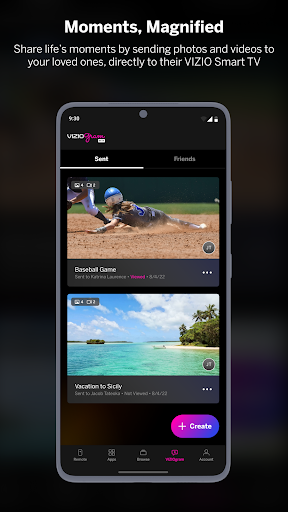
4. **VIZIOgram:** Capture and share your life’s greatest moments on the big screen with VIZIOgram. This feature takes your media experience a step further by letting you display photos and videos on your TV, creating an immersive family viewing experience.
5. **Multi-Room Audio (Not Supported):** While VIZIO Crave Speakers cannot stream audio from TVs/displays or be added as a channel to an existing sound system, the app’s capabilities with SmartCast and Chromecast-enabled audio products make it a versatile solution for home-wide audio management (additional products required).
1. **Easy Accessibility:** The free VIZIO Mobile app is available for download on both Android and iOS, ensuring that you can stay connected to your favorite entertainment platforms, no matter what device you're using.
2. **Broad Functionality:** The app combines several essential entertainment control features in one place, from TV content management to soundbar settings, enhancing the user experience significantly.
3. **User-Friendly Interface:** VIZIO Mobile download and installation processes are smooth and hassle-free, making it easy to get started. The app’s interface is intuitive, enabling users to easily navigate through different functionalities without any learning curve.
4. **Personalization:** With features like WatchFree+ and customizable soundbar settings, users can design their own entertainment experience tailored to their preferences and lifestyles.
5. **Efficient Management:** By consolidating app management, content streaming, and sound control into a single app, VIZIO Mobile app offers efficient time management and streamlined control over home entertainment systems.
1. **Limited Multi-Room Capabilities:** The VIZIO Mobile app does not support streaming different songs to different speakers at the same time from a single app. This requires multiple apps or devices, which might pose a limitation for some users desiring a more expansive audio solution.
2. **Geographic Restrictions:** Some content and applications might only be available in specific countries or languages, limiting the app’s full capabilities depending on your location.
3. **Subscription Charges:** While many features are available for free, there may be additional fees or subscription charges for some content, which can be a downside for users interested in accessing premium content features.
Having used the VIZIO Mobile app extensively, I must say it transforms the way I interact with my home entertainment system. The seamless integration of live TV through WatchFree+ with over 300 free channels is indeed revolutionary. It's like having my TV in my pocket. Transitioning from my big screen to my mobile device is now effortless, thanks to the intuitive “Pick Up Where You Left Off” feature.
The app’s ability to control both the TV and soundbar from my smartphone adds a level of convenience that resonates with modern living. The soundbar control is exceptional, as configuring sound settings has never been more straightforward. I can switch modes based on whether I'm watching a movie, catching up on the latest series, or listening to music.
However, the app isn’t flawless. The lack of support for multi-room streaming from a single mobile device is a slight drawback for those of us who are really into comprehensive home audio systems. Furthermore, navigating geographic restrictions can be a bit of a hassle. Despite these minor issues, the free VIZIO Mobile app offers a comprehensive and feature-rich solution to home entertainment management, making it a must-install for VIZIO users.
1. **How do I download the VIZIO Mobile app?**
- You can download the VIZIO Mobile app from the Google Play Store for Android devices and from the Apple App Store for iOS devices.
2. **Is the VIZIO Mobile app free?**
- Yes, the VIZIO Mobile app is free to download. Some features may require a subscription or additional charges.
3. **Can I use the VIZIO Mobile app to control any VIZIO device?**
- The app supports a range of VIZIO devices, ideal for SmartCast TVs and soundbars. Refer to the app for a complete list of compatible devices.
4. **How do I log into the VIZIO Mobile app?**
- You can log in using your VIZIO account credentials. If you don’t have an account, you’ll need to sign up for one.
5. **Does the VIZIO Mobile app work on all Android and iOS versions?**
- The app is designed to work on most Android and iOS devices. For the best performance, ensure your device’s OS is up-to-date.
In conclusion, the VIZIO Mobile app is a robust tool that not only allows you to take control of your home entertainment setup but also provides a diverse media consumption experience. With its rich set of features and user-friendly interface, it’s a definite upgrade for anyone looking to streamline their entertainment options. Whether adjusting your soundbar’s audio mode or deciding what channel to watch next on the go, VIZIO Mobile brings innovation and convenience to the forefront of your digital lifestyle.